Private pilot · free while it runs

Know if your household got ahead this month, and why.

BudgetBuilt connects your accounts, keeps shared and personal money in separate lanes, sets aside the transfers and card payments that throw other budgets off, and checks every month against your real balances.
No card required · Read-only bank connections · Works on phone and desktop
pilot.budgetbuilt.app
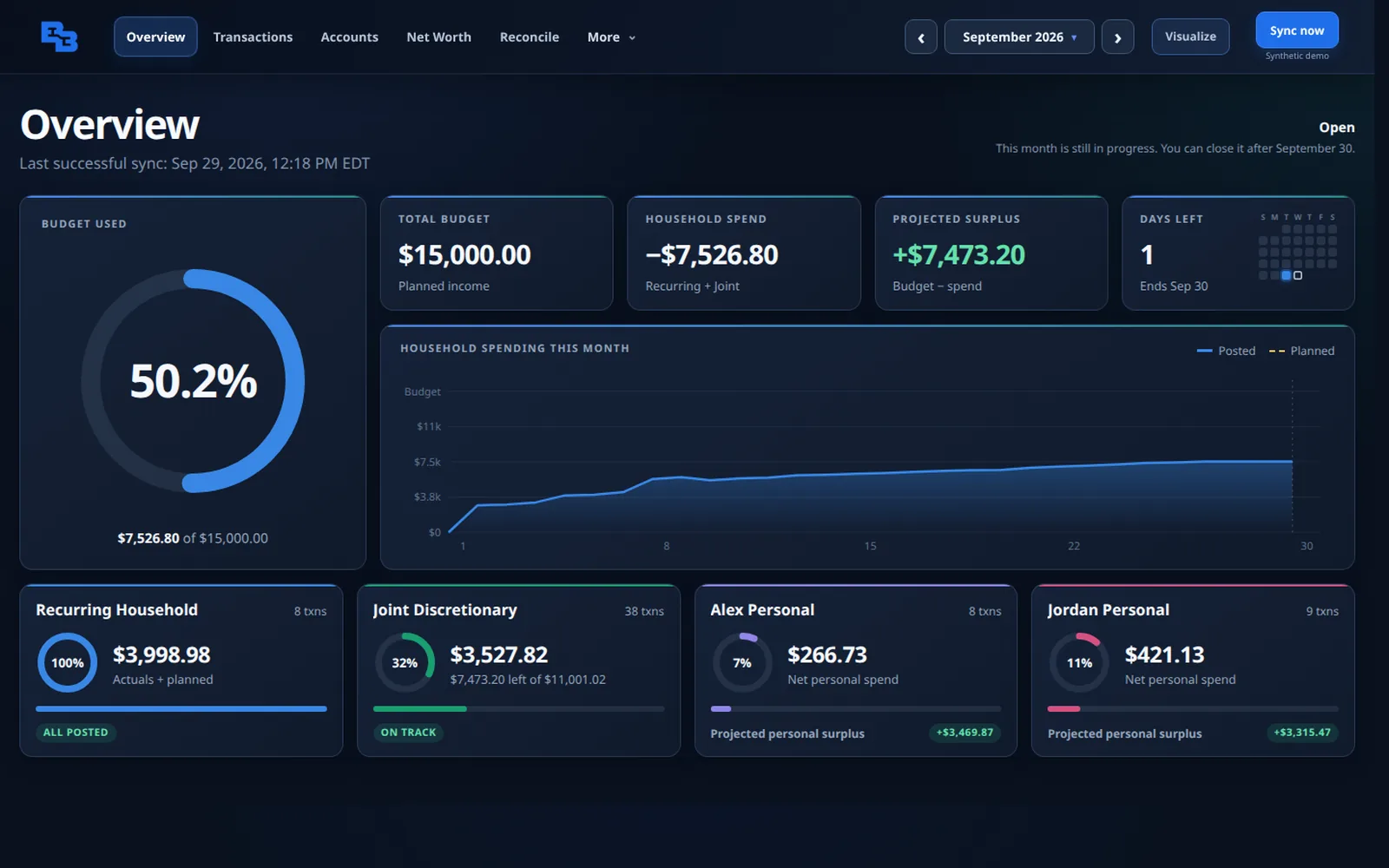
BudgetBuilt Overview: 50% of the monthly budget used, a projected surplus of $7,473, a spending chart, and cards for recurring, joint, and each person's personal spending.
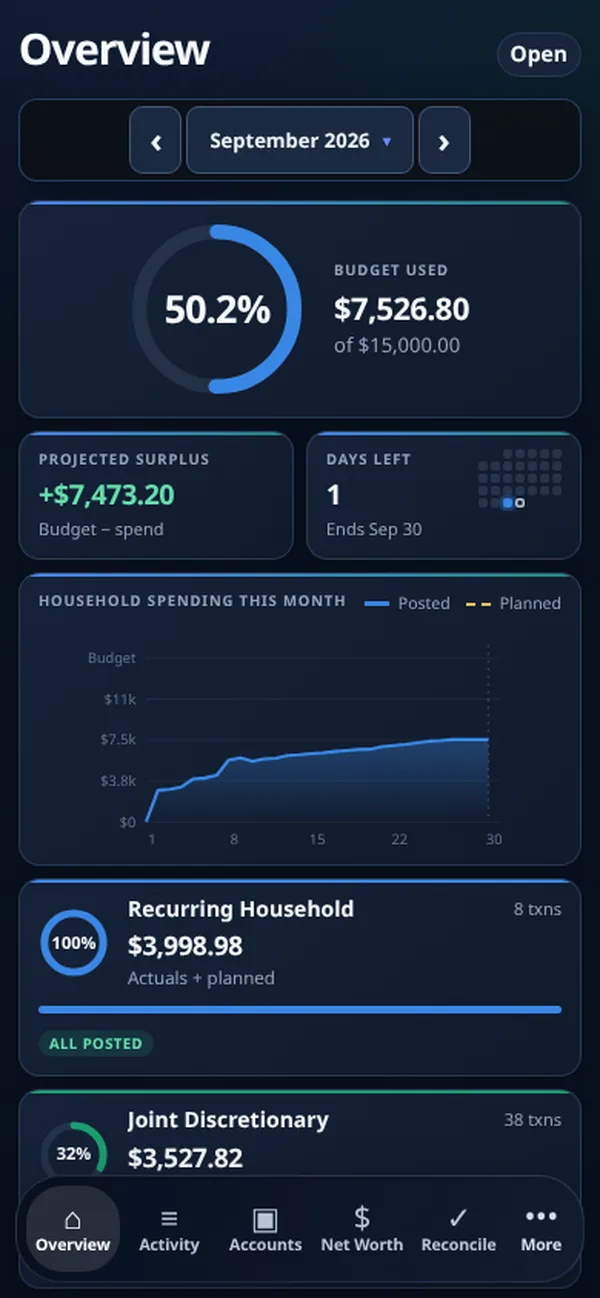
The same Overview on a phone.

Real screens, shown with a synthetic sample household.

Read-onlyBudgetBuilt can never move money.
Shared + personalOne household, separate lanes.
No double countingTransfers and card payments set aside.
ReconciledChecked against your balances.
Why budgets drift

Most budget apps count the same dollar twice.

Money in a real household moves between checking, savings, cards, and people. Treat every movement as spending and the totals stop meaning anything.

Double counted

Card payments look like spending

You buy groceries on a card, then pay the card from checking. Count both and the groceries cost twice.

BudgetBuilt: the purchase counts once; the payment is settlement.
Not spending

Transfers look like expenses

Moving money to savings changes where it sits, not what the household spent.

BudgetBuilt: movement between your own accounts is set aside.
Blended

Everyone's money gets mixed

One partner's personal spending lands in the family budget, and nobody trusts the number.

BudgetBuilt: each person's personal lane stays separate from the shared household.
The product

Everything a household needs to run the month.

Every screen below is the real app, shown with a synthetic sample household.

Overview

The whole month at a glance.

Open the app and know where the month stands before you scroll.

  • Budget used against the month's income
  • Projected surplus after the bills still to come
  • A spending chart with planned bills dotted through month end
  • A card for each lane: recurring bills, joint spending, and each person's personal spending
Overview
Overview screen
Transactions

Every transaction lands in the right lane.

Accounts carry a default lane, so most transactions sort themselves. You review the exceptions.
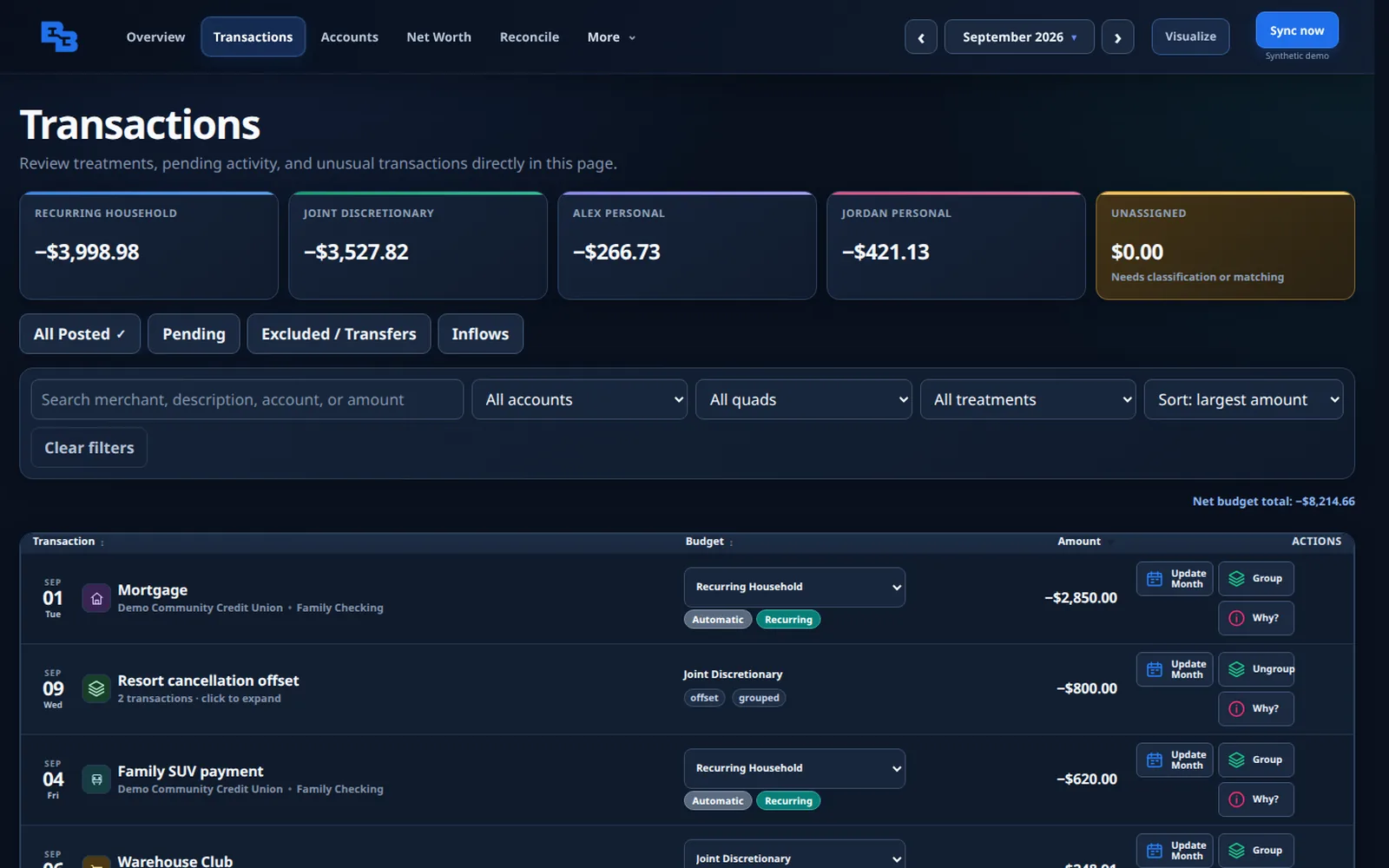
  • Assigned automatically by account and recurring bill
  • Card payments and transfers set aside, never counted twice
  • Group a refund with the purchase it offsets
  • "Why?" explains how any row was counted
Transactions
Transactions screen with totals for each lane and a grouped refund
Reconcile

Prove the month, to the penny.

BudgetBuilt works the month out two ways and compares them.
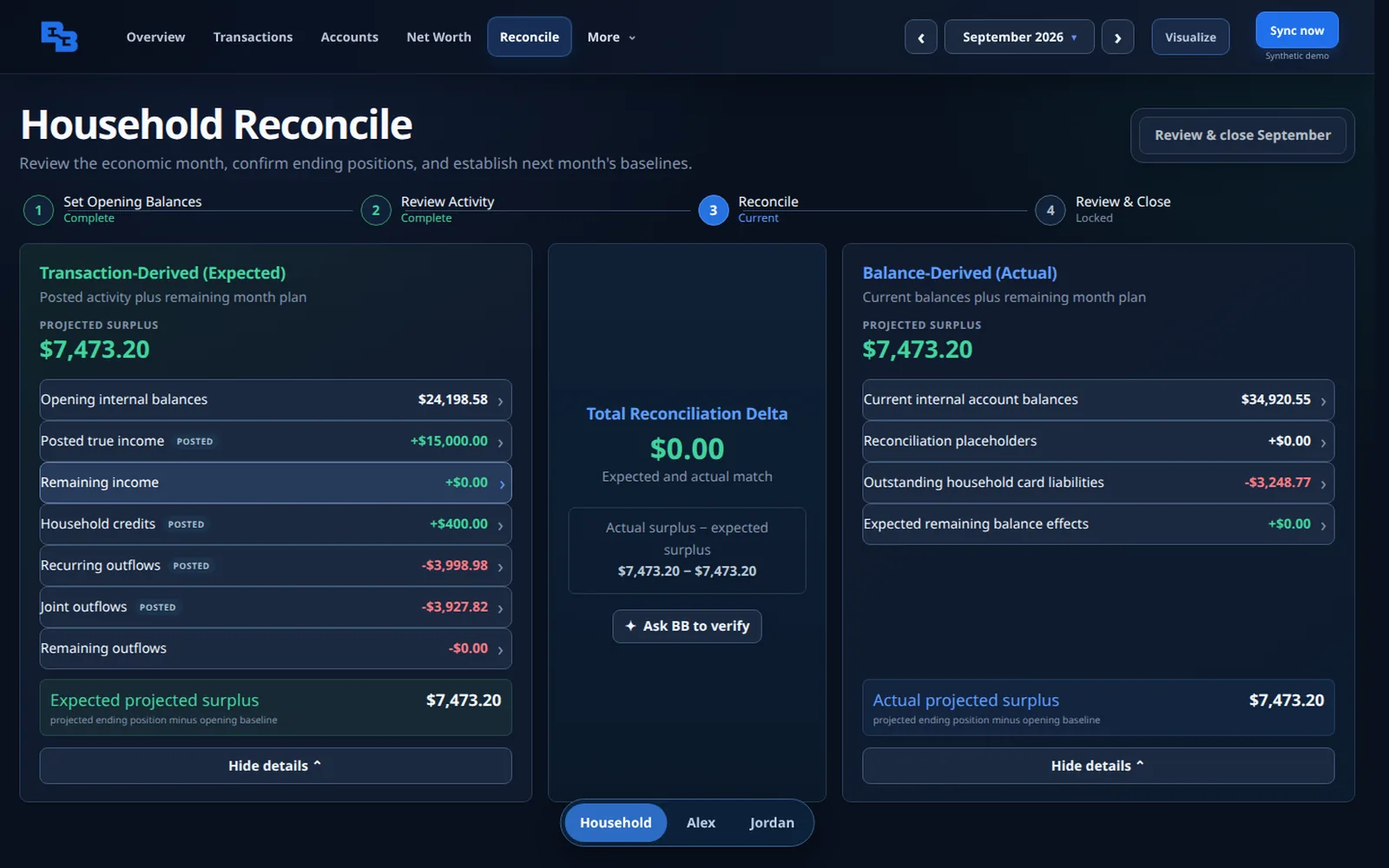
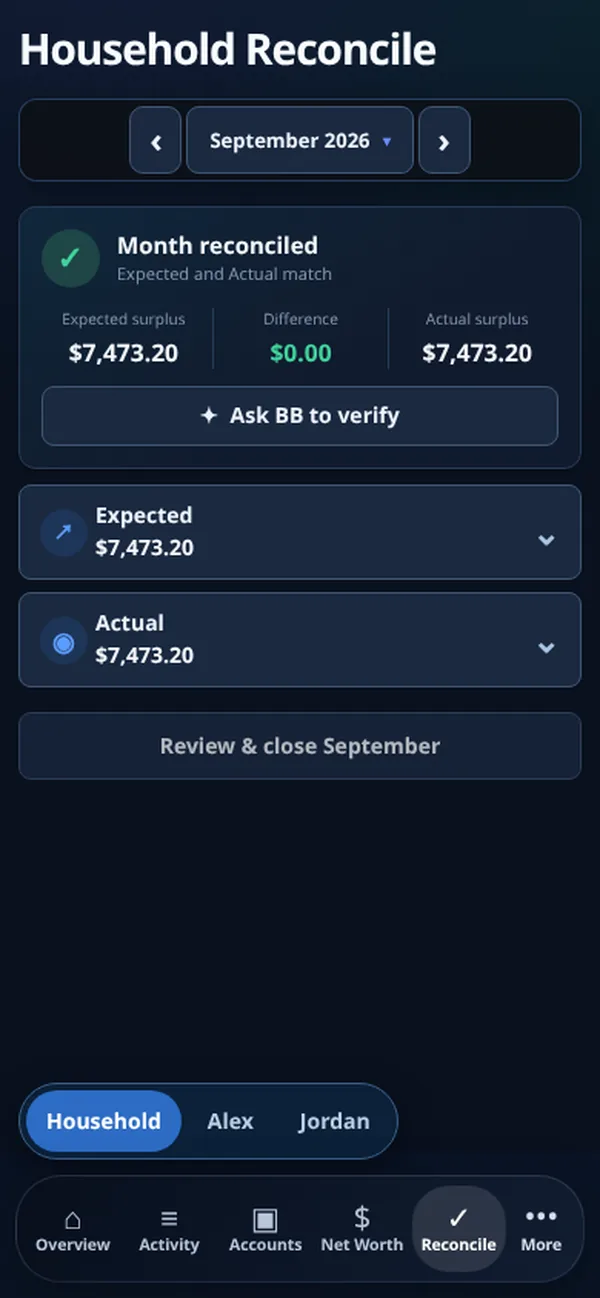
$0.00difference: expected and actual match
  • Expected: opening balances plus the month's real income and spending
  • Actual: what your accounts hold right now
  • When they match, close the month and carry a trusted starting point forward
  • When they don't, Ask BB explains the likely cause without changing your data
Reconcile
Reconcile screen: expected and actual projected surplus both $7,473.20 with a $0.00 difference
Money flow

See where every dollar went.

Follow income through the household into recurring bills, flexible spending, and the categories beneath them, with the surplus that's left at the end.
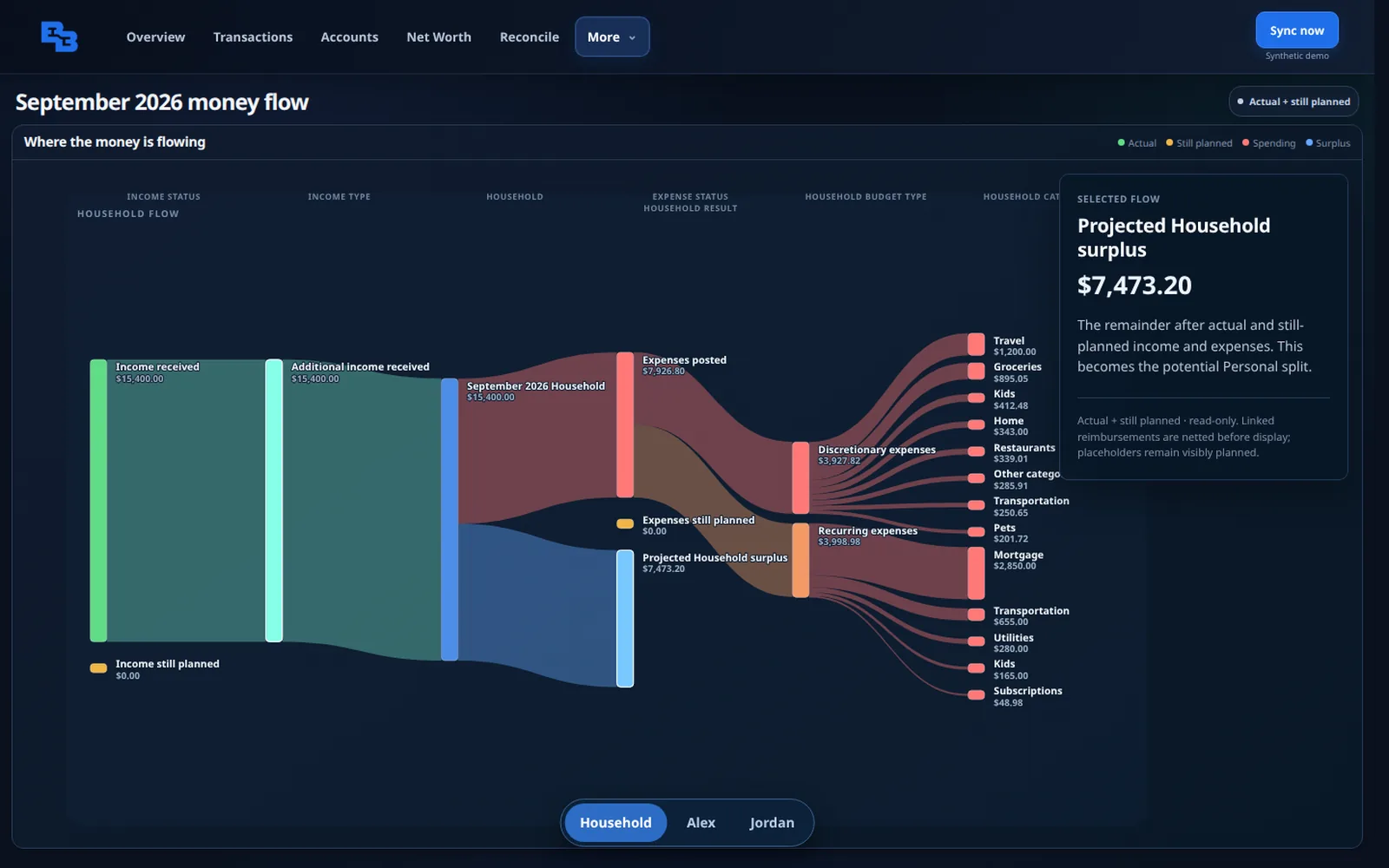
  • Actual and still-planned money shown side by side
  • Refunds netted against what they offset
  • Click any flow for the details behind it
Visualize
Money flow diagram from income to spending categories and surplus
Net worth

Everything you own and owe.

Connected balances sit alongside the things banks don't report.
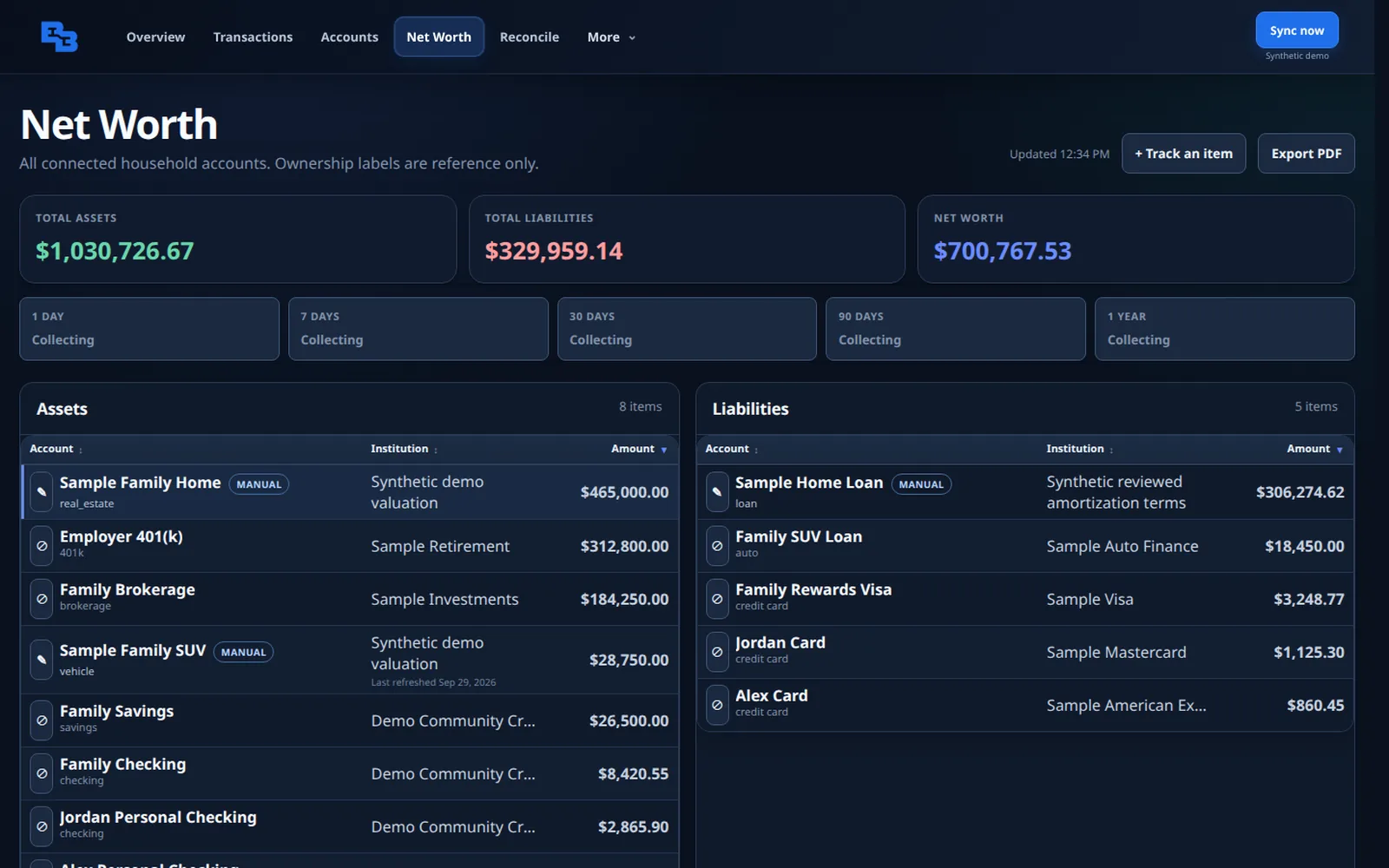
  • Checking, savings, cards, investments, and loans in one list
  • Track a home, vehicle, or loan by hand
  • Export a clean PDF when you need one
Net Worth
Net worth screen listing assets and liabilities
How money is organized

Built for households with shared and personal money.

Every account belongs to a lane. Shared money is budgeted together; personal money stays personal.

Recurring HouseholdShared

Bills that repeat: mortgage or rent, utilities, car payments, subscriptions.

Joint DiscretionaryShared

Flexible family spending: groceries, dining, kids, home.

Alex PersonalPersonal

One partner's own accounts and cards, tracked on their own.

Jordan PersonalPersonal

The other partner's lane. Rename each one to fit your family.

Household income minus recurring bills and joint spendingleaves a projected surplus, shared between personal lanes by the split you choose.
On your phone

The same answers, in your pocket.

Every screen is laid out for the phone, not squeezed onto it.
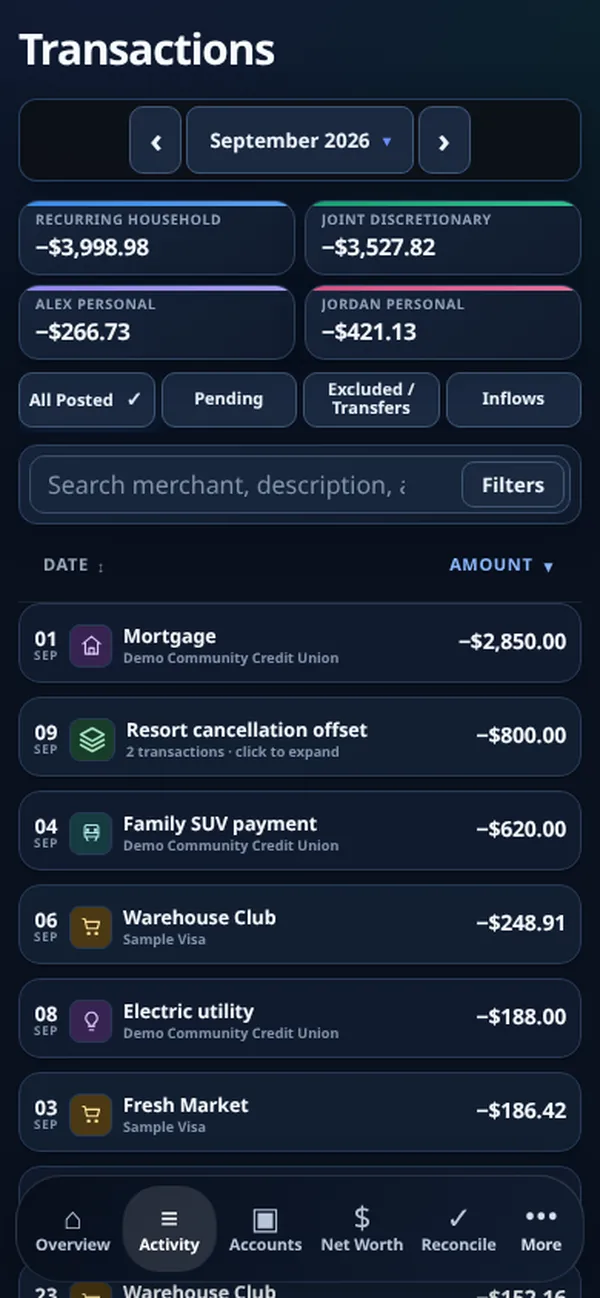
Overview on a phone
Overview
Transactions on a phone
Transactions
Reconcile on a phone showing the month reconciled
Reconcile
How it works

Set it up yourself, with help when you want it.

Create your household

Sign up with your name and email. Your household is ready in seconds, and your sign-in invitation arrives by email.

Connect accounts

Link checking, savings, cards, and loans through a secure, read-only connection.

Map and plan

Add the bills and paychecks you expect. Invite your partner, and each of you can track personal spending.

Close the month

Reconcile, close, and start next month from numbers you trust.

See it before you sign upFollow Alex and Jordan, a sample couple, through a whole month in the real app. About 8 minutes, no sign-up.
Private pilot

Free while the pilot runs.

Pilot households get the full product at no cost in exchange for honest feedback.

After the pilot: active pilot households that close three distinct months and send five pieces of honest feedback qualify for the Founding Family rate of $4.99/month if they choose to continue. The planned regular price is $9.99/month. Nothing is charged without your approval, and you can leave at any time.
Start your household

Create your private BudgetBuilt workspace.

Start with the person who will manage the household. We create your household right away and email you a secure sign-in invitation.

  • Only your name and email to begin
  • No account connections until you're ready
  • Invite a partner later from Family settings

Questions

Straight answers.

Can BudgetBuilt move my money?

No. Connections are read-only. BudgetBuilt reads balances and transactions to organize them; it cannot start transfers or payments.

How do my accounts connect?

Through Plaid, the connection service used by many banking and budgeting apps. You sign in to your bank on Plaid's screen; BudgetBuilt never sees your bank password.

Who is it best for?

Households with several accounts and cards, shared and personal money, regular transfers, or reimbursements: the situations generic budget apps get wrong.

Do both partners get their own login?

Yes. Invite your partner from Family settings. Each person signs in separately, and once there are two of you, each can have their own personal budget.

Does it work on my phone?

Yes. BudgetBuilt runs in your phone's browser with a layout built for small screens. There is nothing to install.

Are the screenshots real?

Yes. They are the current app running a synthetic sample household, so no real family's finances are shown.

What happens after the pilot?

Active pilot households that close three distinct months and send five pieces of honest feedback qualify for the Founding Family rate of $4.99/month if they choose to continue. The planned regular price is $9.99/month. You will get notice before the pilot ends, and nothing is charged without your approval.

Is this financial advice?

No. BudgetBuilt is an organizing and reporting tool. It does not give investment, tax, legal, or financial-planning advice.